
How to Make SVG Gradient Backgrounds Online
Create scalable gradient backgrounds with a free SVG gradient generator.
Published on: Jan 27, 2026

Why Use SVG Gradients?
SVG gradients are vector-based, so they stay crisp at any size. They are great for web backgrounds, hero sections, posters, and UI design where you want a smooth gradient without pixel artifacts.
Try the SVG Gradient Generator now.
Open SVG Gradient GeneratorKey Features
- Linear and radial gradients for different styles.
- Multiple color stops to create complex gradients.
- Angle control for linear gradient direction.
- Custom dimensions for exact background sizes.
- One-click presets for beautiful ready-made color combinations.
- Download SVG instantly (clean, reusable code).
Step-by-Step: Create a Gradient Background
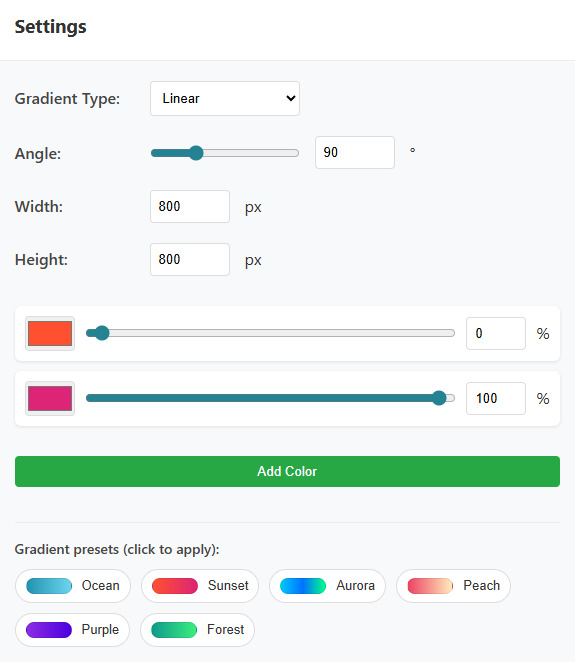
Step 1: Choose Gradient Type
Select Linear for directional gradients or Radial for a center-out glow effect.
Step 2: Set the Direction (Linear)
If you choose linear, adjust the angle to control the gradient direction. For example, 90° is a classic top-to-bottom look.
Step 3: Pick Colors and Offsets
Use Add Color to add more stops. Each stop has a color and an offset percentage. For clean results, spread offsets across 0% to 100%.
Step 4: Try Presets
Click a preset to instantly apply a beautiful gradient. You can still tweak colors and offsets after applying.
Step 5: Download the SVG
Click Download SVG to save your gradient. You can use it directly in HTML/CSS, Figma, Illustrator, or as a website background.
You can also customize width and height anytime by editing the downloaded SVG code.
Tip: SVG backgrounds are great for responsive design. They scale smoothly on mobile and desktop without needing multiple image sizes.
Conclusion
With the SVG Gradient Generator, you can quickly create beautiful gradient backgrounds with presets, fine-tuned color stops, and clean downloadable SVG output.
Create your next SVG gradient background.
Generate an SVG Gradient