
How to Make Speech Bubble Memes Online
Add comic-style speech bubbles to any photo in minutes.
Published on: Jan 25, 2026
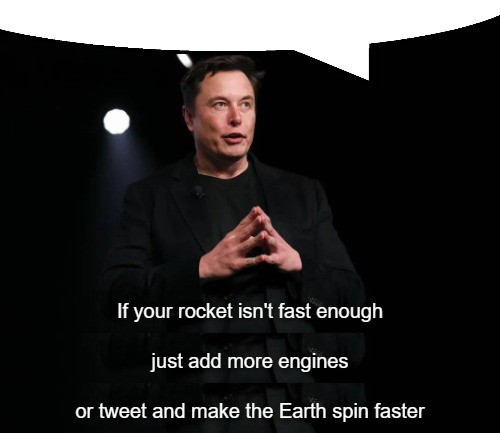
Why Use Speech Bubble Memes?
Speech bubbles make photos look like comic panels. They are perfect for reactions, quick jokes, and simple storytelling. A speech bubble meme maker saves time because you can drag and place bubble shapes in seconds.
Try the speech bubble meme maker now.
Open Speech Bubble Meme MakerStep-by-Step: Add a Speech Bubble to a Photo
Step 1: Upload Your Image
Drag and drop a JPG, PNG, or WEBP image into the workspace.
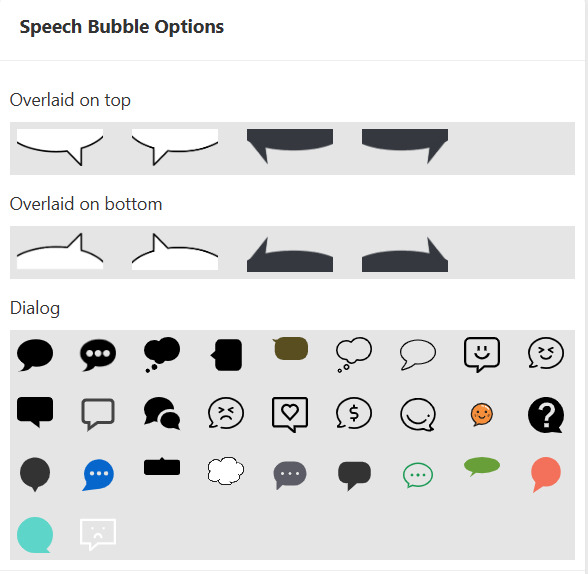
Step 2: Pick a Bubble Style
Choose a top, bottom, or dialog bubble from the options. Each style fits a different layout.
Step 3: Position and Resize
Drag the bubble to the right spot. For SVG dialog bubbles, use the corner handles to resize.
Step 4: Download the Result
Click download to export the meme image with your bubble in place.
Tips for Cleaner Bubble Memes
- Keep the bubble away from key faces or objects.
- Use larger bubbles when the image is busy.
- Match the bubble color to the photo for a clean look.
Tip: If you want to add text inside the bubble, you can add it later using any text overlay tool or editor.
Conclusion
With a simple speech bubble meme maker, you can create comic-style images quickly. Upload, pick a bubble, place it, and download.
Create your first speech bubble meme today.
Make a Speech Bubble Meme